Shopping for a cycling GPS computer involves balancing features, ease of use, and budget. The Garmin Edge 840 stands out as the best overall choice thanks to its touchscreen, comprehensive navigation, and robust performance. For those seeking a budget-friendly option, the Wireless GPS Bike Computer with 2.4 Inch LCD offers essential features at a lower price. Meanwhile, the iGPSPORT BSC300T excels with its touchscreen and offline map navigation, making it ideal for advanced riders. The main tradeoffs in this category include screen size versus portability, detailed navigation versus simplicity, and high-end features versus affordability. Keep reading to see a detailed breakdown that will help you find the perfect cycling GPS computer for your needs.
Listen free for 30 days with Audible
Thousands of audiobooks and originals — cancel anytime.
Start your free trialAs an affiliate, we earn on qualifying purchases.
Key Takeaways
- Top-tier models like the Garmin Edge 840 deliver comprehensive navigation and touchscreen controls, but come with a higher price.
- Budget options such as the Wireless GPS Bike Computer provide essential features and waterproofing without extra bells and whistles.
- Touchscreen interfaces tend to be more intuitive, yet some riders prefer button controls for durability and ease in wet conditions.
- Battery life varies significantly; larger screens and advanced features often mean shorter usage times between charges.
- Navigation accuracy and map detail are key factors for riders exploring new routes, making offline maps and GPS precision crucial.
| Wireless GPS Bike Computer with 2.4 Inch LCD, Waterproof, Auto Backlight, Supports MPH/KMH, 9 Languages |  | Best Overall | Display: 2.4 Inch LCD | Battery Life: 28 hours | Waterproof Rating: IPX7 | VIEW ON AMAZON | See Our Full Breakdown |
| iGPSPORT BSC100S GPS Bike Computer Wireless, 2.6” LCD Display, 40H Rechargeable, Waterproof, Bluetooth & ANT+ |  | Best Value with Extensive Metrics | Display: 2.6 inch LCD | Satellite Support: GPS, Beidou, GLONASS, GALILEO, QZSS | Battery Life: 40 hours | VIEW ON AMAZON | See Our Full Breakdown |
| GPS Bike Computer Wireless Cycling Computer with Auto Backlight, 2.4 Inch LCD Speedometer and Odometer, IPX7 Waterproof, Auto Start/Stop for Road and Mountain Bikes |  | Best for Simplicity and Automatic Features | Display Size: 2.4 Inch | Waterproof Rating: IPX7 | Auto Backlight: Yes | VIEW ON AMAZON | See Our Full Breakdown |
| Garmin Edge 840 GPS Cycling Computer with Touchscreen and Buttons |  | Best for Advanced Navigation and Personalization | Battery Life: Up to 26 hours | Display: Touchscreen and buttons | Navigation: Multi-band GNSS | VIEW ON AMAZON | See Our Full Breakdown |
| iGPSPORT BSC300T Wireless Bike Computer GPS with Touchscreen and Offline Map Navigation |  | Best for Versatile Navigation and Detailed Data | Screen Size: 2.4 inches | Navigation: Offline maps, turn prompts | GPS Support: GPS, Beidou, GLONASS, Galileo, QZSS | VIEW ON AMAZON | See Our Full Breakdown |
| GEOID CC600 Color Screen Bike/Cycling Computer Wireless with Route Navigation, WiFi & Bluetooth, 5s GPS Positioning, Indoor Training Support |  | Best for Versatility and Customization | Display: 2.4-inch colorful screen with durable Asahi glass | Memory Storage: Up to 100 hours of ride data | Navigation: Colorful route navigation with turn reminders and GPX upload | VIEW ON AMAZON | See Our Full Breakdown |
| COROS DURA Solar GPS Bike Computer |  | Best for Long Rides and Battery Life | Battery Life: 120 hours in full GPS mode | Solar Charging: Up to 2 extra hours of runtime per hour of sunlight | Display: 2.7-inch MIP color touchscreen | VIEW ON AMAZON | See Our Full Breakdown |
| COOSPO Color Touchscreen GPS Bike Computer CS600 |  | Best for Multi-Day Rides and Professional Training | Display Size: 2.4 Inches | Display: LCD with auto-backlight | Battery Life: 36 Hours | VIEW ON AMAZON | See Our Full Breakdown |
| Garmin Edge 540 GPS Cycling Computer with Button Controls | 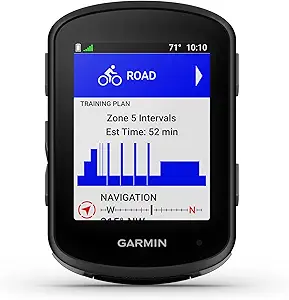 | Best for Advanced Navigation and Training | Battery Life: up to 26 hours | Battery Saver Mode: up to 42 hours | Navigation Technology: multi-band GNSS | VIEW ON AMAZON | See Our Full Breakdown |
| Wahoo ELEMNT Bolt V3 GPS Cycling/Bike Computer, Black |  | Best for Turn-by-Turn Navigation and Connectivity | Navigation: Turn-by-turn prompts, route import from GPX, TCX, Strava, Ride With GPS, Komoot | Connectivity: Bluetooth, ANT+ | Notifications: Smart notifications for calls, texts, emails | VIEW ON AMAZON | See Our Full Breakdown |
| CYCPLUS GPS Bike Computer, Wireless Cycling Computer with Automatic Backlight, Waterproof, Large Battery, Data Analysis |  | Best for Long-Distance Data Tracking and High Visibility | GPS Positioning: High sensitivity, accurate | Display Technology: FSTN | Backlight: Automatic, glare-free | VIEW ON AMAZON | See Our Full Breakdown |
| Wireless GPS Bike Computer with Auto Backlight, Waterproof Cycling Speedometer and Odometer |  | Best for All-Weather Simplicity and Basic Metrics | Display: 2.4 inch LCD | Battery: 650mAh rechargeable | Battery Life: Up to 28 hours | VIEW ON AMAZON | See Our Full Breakdown |
| iGPSPORT BSC200S GPS Bike Computer, Wireless Route Navigation, 2.4” Screen, Bluetooth, ANT+, IPX7 Waterproof |  | Best for Route Navigation and App Compatibility | Display: 2.4-inch semi-transparent color screen | Battery: 600mAh | Battery Life: Up to 25 hours | VIEW ON AMAZON | See Our Full Breakdown |
| iGPSPORT BSC500 GPS Bike Computer with 3.3” Touchscreen, Voice Navigation, and Climb Training |  | Best for Advanced Navigation and Climb Training | Screen Size: 3.3 inches | Navigation: GPS, Beidou, GLONASS, GALILEO, QZSS | Operation: Touchscreen and buttons | VIEW ON AMAZON | See Our Full Breakdown |
| cycling gps computer | Display | Battery Life |
|---|---|---|
| Wireless GPS Bike Computer wit | 2.4 Inch LCD | 28 hours |
| iGPSPORT BSC100S GPS Bike Comp | 2.6 inch LCD | 40 hours |
| GPS Bike Computer Wireless Cyc | — | — |
| Garmin Edge 840 GPS Cycling Co | Touchscreen and buttons | Up to 26 hours |
| iGPSPORT BSC300T Wireless Bike | — | — |
| GEOID CC600 Color Screen Bike/ | 2.4-inch colorful screen with durable Asahi glass | — |
| COROS DURA Solar GPS Bike Comp | 2.7-inch MIP color touchscreen | 120 hours in full GPS mode |
| COOSPO Color Touchscreen GPS B | LCD with auto-backlight | 36 Hours |
| Garmin Edge 540 GPS Cycling Co | On-screen workout prompts | up to 26 hours |
| Wahoo ELEMNT Bolt V3 GPS Cycli | LED indicators, on-screen prompts | — |
| CYCPLUS GPS Bike Computer | — | Over 55 hours |
| Wireless GPS Bike Computer wit | 2.4 inch LCD | Up to 28 hours |
| iGPSPORT BSC200S GPS Bike Comp | 2.4-inch semi-transparent color screen | Up to 25 hours |
| iGPSPORT BSC500 GPS Bike Compu | — | — |
More Details on Our Top Picks
Wireless GPS Bike Computer with 2.4 Inch LCD, Waterproof, Auto Backlight, Supports MPH/KMH, 9 Languages
This wireless GPS bike computer stands out as the most well-rounded choice thanks to its large 2.4-inch LCD, long 28-hour battery life, and auto backlight, making it ideal for most outdoor riders. Compared with the Garmin Edge 840, it offers simpler operation without complex features, but sacrifices some advanced analytics and navigation options. Its waterproof design and multilingual support enhance usability across diverse conditions. The main tradeoff is that it relies solely on GPS signals, which can be affected by weather or terrain, and the battery isn’t user-replaceable. Overall, this model suits riders who want reliable, straightforward tracking without the premium price tag of high-end devices.Pros:- Accurate GPS tracking for most ride metrics
- Easy wireless setup without wiring or magnets
- Large, clear display with auto backlight for all lighting conditions
- Long battery life supporting extended rides
Cons:- GPS signal may be affected by terrain or weather conditions
- Limited to outdoor cycling, not suitable for indoor use
- Battery cannot be replaced, only recharged
Best for: Casual outdoor cyclists who prioritize ease of use and long battery life.
Not ideal for: Data enthusiasts seeking advanced navigation, training analytics, or customizable metrics.
- Display:2.4 Inch LCD
- Battery Life:28 hours
- Waterproof Rating:IPX7
- Languages:9
- Supports:MPH and KMH
Our verdict“This GPS computer is best suited for riders who need simple, reliable tracking with long-lasting battery life and straightforward operation.”
iGPSPORT BSC100S GPS Bike Computer Wireless, 2.6” LCD Display, 40H Rechargeable, Waterproof, Bluetooth & ANT+
The iGPSPORT BSC100S offers a compelling combination of extensive data metrics, supporting over 40 ride parameters including calories and cadence, all displayed on a sizable 2.6-inch anti-glare screen. Unlike the Garmin Edge 840, it doesn’t have advanced navigation or touch features, but its long 40-hour battery life and support for multiple satellite systems make it ideal for serious long-distance riders. Its waterproof design and Bluetooth/ANT+ connectivity allow integration with various sensors, making it more versatile. The downside is that the slightly smaller screen may not suit users who prefer larger displays, and it relies on app connectivity for full data analysis. This device makes the most sense for riders seeking detailed analytics at a more accessible price point.Pros:- Supports multiple satellite systems for quick, accurate positioning
- Large, anti-glare display for easy visibility
- Impressive 40-hour battery life for extended use
- Waterproof design suitable for all weather conditions
Cons:- Screen size may be small for some users
- Full data analysis requires app connection
- Lacks a dedicated backlit display for night riding
Best for: Long-distance riders and data-focused cyclists who want extensive metrics without the high cost.
Not ideal for: Casual riders who prefer simple displays or basic ride data.
- Display:2.6 inch LCD
- Satellite Support:GPS, Beidou, GLONASS, GALILEO, QZSS
- Battery Life:40 hours
- Battery Capacity:600mAh
- Waterproof:IPX7
- Connectivity:Bluetooth 5.0, ANT+
Our verdict“Ideal for cyclists who prioritize detailed metrics and long battery life over advanced navigation features.”
GPS Bike Computer Wireless Cycling Computer with Auto Backlight, 2.4 Inch LCD Speedometer and Odometer, IPX7 Waterproof, Auto Start/Stop for Road and Mountain Bikes
This GPS bike computer combines core ride metrics with automatic start/stop and a clear 2.4-inch display, making it a strong choice for riders who want minimal fuss. Compared to the Garmin Edge 840, it offers fewer advanced features but excels in ease of use and straightforward installation. The auto start/stop function is particularly useful for commuters or casual riders, and its waterproof design ensures durability. The main limitation is that it’s limited to GPS tracking without added sensors for cadence or heart rate, and its battery life isn’t specified beyond basic waterproofing. This pick is best for riders who want a simple, reliable device that automatically tracks their rides without complex setup.Pros:- Accurate GPS tracking for ride data
- Auto start/stop feature for convenience
- Clear, easy-to-read display in various conditions
- Waterproof IPX7 design for all weather riding
Cons:- Limited to GPS tracking, no additional sensors
- Battery life details are not specified
- No advanced training or navigation features
Best for: Casual cyclists and commuters who want automatic ride tracking in a simple package.
Not ideal for: Performance-focused cyclists or those seeking detailed analytics and customization.
- Display Size:2.4 Inch
- Waterproof Rating:IPX7
- Auto Backlight:Yes
- Auto Start/Stop:Yes
Our verdict“This device is best for riders who want automatic, hassle-free GPS tracking with minimal setup.”
Garmin Edge 840 GPS Cycling Computer with Touchscreen and Buttons
The Garmin Edge 840 offers a sophisticated mix of touchscreen and button controls, making it adaptable for different riding conditions. Its multi-band GNSS technology ensures precise positioning even in challenging environments, outperforming simpler models like the iGPSPORT BSC100S in navigation accuracy. It provides a wealth of features, including adaptive coaching, climb insights, and ride-specific maps, ideal for serious cyclists who want detailed analytics and training tools. The main drawback is its high price and complex interface, which can be overwhelming for casual users. This device is suited to riders who need the most advanced navigation, training, and performance insights in a compact form.Pros:- Responsive touchscreen and button controls
- Multi-band GNSS for precise navigation
- Extensive training and performance analytics
- Long battery life up to 26 hours in demanding use
Cons:- Steep learning curve due to complex features
- Premium price may be prohibitive for casual users
- Requires compatible sensors for full capabilities
Best for: Performance-oriented cyclists, racers, and tech-savvy riders who want detailed, customizable data.
Not ideal for: Casual riders or those new to cycling computers who prefer simple, one-touch devices.
- Battery Life:Up to 26 hours
- Display:Touchscreen and buttons
- Navigation:Multi-band GNSS
- Features:Adaptive coaching, climb/effort insights
- Compatibility:Power meter and heart rate monitor
Our verdict“Best suited for cyclists seeking advanced navigation, detailed analytics, and customization, willing to navigate a complex interface.”
iGPSPORT BSC300T Wireless Bike Computer GPS with Touchscreen and Offline Map Navigation
The iGPSPORT BSC300T combines a large 2.4-inch touchscreen with robust offline map navigation, making it ideal for riders who explore new routes or travel in unfamiliar areas. Its support for global satellite systems and offline maps surpasses simpler devices like the Wireless GPS Bike Computer, offering turn-by-turn guidance and route planning. The device’s ability to support over 130 data metrics, including cadence, temperature, and altitude, makes it a versatile option for both casual and serious cyclists. However, its setup can be complex, and battery life details are not explicitly provided, which could be a concern for long rides. This model is perfect for those who want comprehensive navigation and data options in a single device.Pros:- Large, easy-to-operate touchscreen display
- Supports offline maps and turn-by-turn navigation
- Accurate positioning with multi-satellite support
- Over 130 data metrics for detailed analysis
Cons:- Setup may be challenging for beginners
- Battery life not specified, may vary with usage
- Some features require app connection
Best for: Cyclists who prioritize navigation, route planning, and extensive ride data, especially in unfamiliar terrain.
Not ideal for: Beginners or casual riders who prefer plug-and-play simplicity without complex setup.
- Screen Size:2.4 inches
- Navigation:Offline maps, turn prompts
- GPS Support:GPS, Beidou, GLONASS, Galileo, QZSS
- Connectivity:ANT+/Bluetooth 5.0
- Supported Bikes:Road, Mountain, E-bike
- Data Metrics:130+
Our verdict“Best suited for adventurous cyclists seeking detailed navigation, extensive data, and offline map capabilities.”
GEOID CC600 Color Screen Bike/Cycling Computer Wireless with Route Navigation, WiFi & Bluetooth, 5s GPS Positioning, Indoor Training Support
The GEOID CC600 stands out for its vibrant 2.4-inch color display and rapid 5-second GPS fix, making it a strong choice for cyclists who value detailed route navigation and data customization. Compared to the Wahoo ELEMNT Bolt V3, it offers a more colorful interface and indoor training support, though its setup can be complex for newcomers. Its multi-satellite support ensures reliable positioning, while WiFi and Bluetooth facilitate seamless data transfer. However, the device’s complex configuration and limited battery details suggest it may challenge beginners or those seeking simplicity. This device is ideal for experienced riders who want a customizable, navigation-focused computer with indoor training options.Pros:- Fast 5-second GPS fix with multi-satellite support
- Vibrant, durable display with customizable data pages
- Wireless data transfer via WiFi and Bluetooth
- Supports indoor training for performance gains
Cons:- Complex setup may intimidate new users
- Limited battery life information provided
Best for: Cyclists who crave detailed data customization, multi-satellite support, and indoor training features.
Not ideal for: Beginners or riders who prefer plug-and-play simplicity and straightforward setup without extensive configuration.
- Display:2.4-inch colorful screen with durable Asahi glass
- Memory Storage:Up to 100 hours of ride data
- Navigation:Colorful route navigation with turn reminders and GPX upload
- GPS Positioning:Supports GPS, BEIDOU, GLONASS, QZSS, GALILEO; 5-second fix with WiFi & AGNSS
- Connectivity:WiFi, Bluetooth, ANT+
- Data Compatibility:Supports FIT files, compatible with STRAVA and TrainingPeaks
Our verdict“This cycling computer suits experienced users seeking advanced navigation and customization, but may overwhelm beginners.”
COROS DURA Solar GPS Bike Computer
The COROS DURA Solar stands out for its impressive 120-hour battery life in full GPS mode, making it ideal for long-distance rides. Unlike the Garmin Edge 540, which offers detailed ride metrics and training tools, the DURA Solar emphasizes endurance and solar charging, reducing the need for frequent recharges. Its responsive 2.7-inch touchscreen provides clear visibility in sunlight, and solar charging extends usage further in sunny conditions. The main tradeoff is its reliance on sunlight for maximum benefit, potentially limiting performance in less sunny environments, and it may be less feature-rich for structured training compared to Garmin’s advanced options. This device targets long-distance riders and those who prioritize battery endurance over extensive training features.Pros:- Exceptional 120-hour battery life for extended trips
- Solar charging adds extra runtime in sunlight
- Responsive touchscreen with glove compatibility
- Clear display visible in bright conditions
Cons:- Dependent on sunlight for optimal solar charging
- May be complex for users unfamiliar with navigation apps
Best for: Ultralight or long-distance cyclists needing extended battery life and solar charging capabilities.
Not ideal for: Casual or indoor-focused riders who don’t require prolonged GPS use or solar features.
- Battery Life:120 hours in full GPS mode
- Solar Charging:Up to 2 extra hours of runtime per hour of sunlight
- Display:2.7-inch MIP color touchscreen
- Navigation:Turn-by-turn with smart rerouting
- Sync Speed:Fast data transfer
- Compatibility:Strava, Ride with GPS, Komoot
Our verdict“This GPS computer is perfect for endurance riders prioritizing long battery life and solar power, but less suitable for casual or indoor training needs.”
COOSPO Color Touchscreen GPS Bike Computer CS600
The COOSPO CS600 offers a balanced mix of a 2.4-inch color touchscreen, accurate GPS tracking, and a solid 36-hour battery, making it suitable for multi-day rides. Compared with the COROS DURA Solar, it emphasizes consistent battery life over solar charging benefits. Its waterproof IPX7 rating and seamless Bluetooth and ANT+ connectivity support comprehensive data analysis and device integration. The interface might seem complex for some, especially those new to GPS cycling computers. While it lacks built-in sensors, it’s a good fit for riders who want reliable navigation and data sync without fussing over add-ons. This device is ideal for serious riders and trainers who need dependable long-lasting performance.Pros:- High-resolution color touchscreen with auto-backlight
- Accurate GPS and route navigation
- Long-lasting 36-hour battery
- Seamless wireless sync with popular apps
Cons:- Lacks additional sensors or mounts included
- Interface may be complex for beginners
Best for: Cyclists involved in multi-day tours or professional training seeking reliable GPS and data sync.
Not ideal for: Casual riders or those looking for advanced built-in sensors or ultra-lightweight devices.
- Display Size:2.4 Inches
- Display:LCD with auto-backlight
- Battery Life:36 Hours
- Sensor Type:GPS
- Battery Type:Lithium Metal
- Waterproof Rating:IPX7
Our verdict“This computer suits serious cyclists needing dependable navigation and long battery life for extended rides, but not the most feature-rich for sensor integration.”
Garmin Edge 540 GPS Cycling Computer with Button Controls
The Garmin Edge 540 combines compact size with sophisticated navigation, including multi-band GNSS for precise positioning, making it ideal for demanding riders. Unlike the simpler Wahoo ELEMNT Bolt V3, it offers features like climb planning, stamina insights, and ride-specific maps, supporting structured training. Its up to 26-hour battery life balances performance with endurance, but the need for compatible sensors for full functionality and its premium price can be barriers for some users. The intuitive button controls appeal to those who prefer physical keys over touchscreens. Overall, this device is best suited for serious cyclists focused on detailed analytics and advanced navigation, willing to invest in a feature-rich unit.Pros:- Multi-band GNSS for accurate positioning
- Personalized coaching and training prompts
- Longer battery life for demanding rides
- Ride-specific maps and points of interest
Cons:- Requires compatible sensors for full features
- Higher price and complex operation for novices
Best for: Competitive cyclists and serious trainers seeking precise navigation, detailed ride analytics, and endurance features.
Not ideal for: Casual riders or beginners who don’t need advanced training tools or multi-band GNSS accuracy.
- Battery Life:up to 26 hours
- Battery Saver Mode:up to 42 hours
- Navigation Technology:multi-band GNSS
- Display:On-screen workout prompts
- Connectivity:Smart connectivity
- Compatibility:Requires compatible power meter and HR monitor
Our verdict“This computer offers comprehensive navigation and training tools for dedicated cyclists willing to invest in detailed analytics.”
Wahoo ELEMNT Bolt V3 GPS Cycling/Bike Computer, Black
The Wahoo ELEMNT Bolt V3 excels in its user-friendly interface and advanced navigation, featuring turn-by-turn prompts with both audible cues and LED indicators, making it stand out for real-time guidance. Its seamless route import from platforms like Strava and Komoot, combined with automatic route updates, supports riders who prefer minimal manual input. The ANT+ radar integration adds a safety layer with vehicle proximity alerts, especially useful in busy traffic. However, some features depend on a smartphone connection, and the higher price may deter casual users. Its simplicity in operation makes it ideal for riders who want reliable, intuitive navigation and connectivity without complexity.Pros:- Advanced turn-by-turn navigation with audible and LED cues
- Automatic route and workout uploads
- Real-time vehicle proximity alerts via ANT+ radar
- Intuitive, easy-to-use interface
Cons:- Requires smartphone for some features
- Price is higher than basic GPS units
Best for: Serious cyclists and commuters seeking reliable turn-by-turn navigation with vehicle proximity alerts.
Not ideal for: Beginners or riders who prefer standalone units without smartphone dependency or advanced radar features.
- Navigation:Turn-by-turn prompts, route import from GPX, TCX, Strava, Ride With GPS, Komoot
- Connectivity:Bluetooth, ANT+
- Notifications:Smart notifications for calls, texts, emails
- Radar Integration:ANT+ rearview radar compatible
- Display:LED indicators, on-screen prompts
- Route Generation:On-device and app-based route creation
Our verdict“This GPS computer is perfect for riders who want reliable, easy navigation with added safety features, though it comes at a premium price.”
CYCPLUS GPS Bike Computer, Wireless Cycling Computer with Automatic Backlight, Waterproof, Large Battery, Data Analysis
This option stands out for its high-sensitivity GPS that ensures precise route tracking, making it ideal for long-distance riders who need reliable data. Unlike the iGPSPORT BSC200S, which offers route navigation but with a smaller display and limited data features, the CYCPLUS emphasizes accuracy and clarity, especially in sunlight. Its large 1200mAh battery supports over 55 hours of use, surpassing most competitors like the BSC500, which focuses more on touchscreen functionality. The waterproof design and automatic sleep mode help it excel in all weather conditions, though data can be lost if manually powered off, a tradeoff for its long battery life. Overall, this is best suited for cyclists who prioritize detailed data analysis over touchscreen ease or advanced navigation features.
Pros:- High-accuracy GPS tracking for detailed data
- Excellent visibility in sunlight with glare-free display
- Long-lasting battery over 55 hours
- Waterproof IPX6 design for all weather use
Cons:- Data may be lost if manually powered off, risking information loss
- Automatic sleep mode may require manual restart to access data
Best for: Cyclists needing high-accuracy route data and extended battery life for long rides
Not ideal for: Casual riders or those seeking a touchscreen interface with advanced navigation features
- GPS Positioning:High sensitivity, accurate
- Display Technology:FSTN
- Backlight:Automatic, glare-free
- Waterproof:IPX6
- Battery Capacity:1200mAh
- Battery Life:Over 55 hours
- Sleep Mode:Automatic after 10 minutes of inactivity
Our verdict“This is the best choice for serious cyclists who need reliable, long-term data collection in all weather conditions.”
Wireless GPS Bike Computer with Auto Backlight, Waterproof Cycling Speedometer and Odometer
This model makes sense for riders who want straightforward speed and distance data without complex navigation, especially compared to the iGPSPORT BSC200S which offers route planning. Its 2.4-inch LCD with automatic backlight ensures decent visibility, and the 650mAh rechargeable battery provides up to 28 hours of operation, suitable for day-long rides. The IPX7 waterproof rating is a step above many basic models, making it reliable in rain. However, it lacks smartphone connectivity and advanced training features, limiting its use for tech-savvy or performance-focused cyclists. While it’s easy to set up and use, it doesn’t support route import or detailed ride analysis, making it best suited for casual or commuter riders who want durable, simple tracking.
Pros:- Reliable waterproof IPX7 rating for all weather conditions
- Automatic backlight improves visibility in various lighting
- Simple wireless setup for quick installation
- Decent battery life for long rides
Cons:- Limited to basic metrics without advanced training tools
- No smartphone connectivity or route import options
Best for: Casual cyclists and commuters who need reliable basic metrics in all weather
Not ideal for: Performance cyclists or those seeking advanced navigation or training features
- Display:2.4 inch LCD
- Battery:650mAh rechargeable
- Battery Life:Up to 28 hours
- Waterproof:IPX7
- Included Accessories:Bike mount, rubber pad, USB C cable, manual
- Metrics:Speed, distance, time, temperature, altitude, gradient
Our verdict“This is a solid pick for riders who want durable, straightforward ride data without extra complexity.”
iGPSPORT BSC200S GPS Bike Computer, Wireless Route Navigation, 2.4” Screen, Bluetooth, ANT+, IPX7 Waterproof
Compared with the simpler BSC200S, the BSC200S offers route navigation and compatibility with apps like Strava and Komoot, making it ideal for cyclists who want to plan or import routes. Its 2.4-inch semi-transparent color screen provides clear visibility even under sunlight, and a 25-hour battery life matches many competitors. The ability to connect with lights and radar enhances safety, but setup requires app configuration, which could be a hurdle for less tech-savvy users. It doesn’t feature a touchscreen, relying instead on physical buttons, which may slow navigation. This makes the BSC200S well-suited for riders who want detailed route info and app integration without the complexity of touchscreen devices.
Pros:- Supports route import and customization via multiple apps
- Long battery life up to 25 hours
- Bright, clear display visible under sunlight
- Supports safety accessories like lights and radar
Cons:- Requires app setup for full functionality, adding complexity
- Limited to physical buttons, no touchscreen interface
Best for: Riders who prioritize route planning, app integration, and safety features
Not ideal for: Cyclists seeking a touchscreen interface or those who prefer straightforward metrics without navigation
- Display:2.4-inch semi-transparent color screen
- Battery:600mAh
- Battery Life:Up to 25 hours
- Waterproof:IPX7
- Connectivity:Bluetooth, ANT+
- Supported Apps:iGPSPORT, Strava, Ride with GPS, Komoot
Our verdict“Ideal for cyclists who want route flexibility and app compatibility without the fuss of a touchscreen interface.”
iGPSPORT BSC500 GPS Bike Computer with 3.3” Touchscreen, Voice Navigation, and Climb Training
This device makes a compelling case for riders who want a large, intuitive touchscreen combined with voice navigation, surpassing the smaller, button-based BSC200S in usability. The 3.3-inch screen offers easy readability during rides, while multiple satellite support ensures accurate positioning across challenging terrains. Its voice alerts help riders stay focused without glancing at the screen, a notable advantage over simpler models like the BSC200S. However, the feature set’s complexity may require a learning curve, and the absence of waterproof ratings raises questions about durability in harsh weather. It’s best suited for performance-minded cyclists who want detailed route guidance and climb training in a user-friendly package, provided they’re willing to learn its features.
Pros:- Large, easy-to-read touchscreen display
- Supports multiple global satellite systems for precise navigation
- Voice navigation alerts reduce screen glances
- Supports route import and climb training
Cons:- Features may have a learning curve for new users
- No explicit waterproof or weather resistance info
Best for: Performance cyclists and trail riders seeking large display and voice guidance
Not ideal for: Casual riders or those riding in wet environments without waterproof assurance
- Screen Size:3.3 inches
- Navigation:GPS, Beidou, GLONASS, GALILEO, QZSS
- Operation:Touchscreen and buttons
- Features:Voice navigation, route import, climb training
- Supported Apps:Strava, Komoot
- Battery:Unknown, likely similar to other models, but specific data not provided
Our verdict“This is the best choice for tech-savvy riders who want a large display with voice-guided navigation and training features.”

How We Picked
These products were selected based on a combination of performance, usability, build quality, and value. We prioritized models with reliable GPS accuracy, clear displays, and durable waterproofing suitable for various riding conditions. Ease of use, especially interface design and setup complexity, played a significant role, along with battery life and additional features like navigation or training tools. Products were ranked to highlight those offering the best balance of features for different rider needs—from beginners to seasoned cyclists—ensuring a wide range of options for various budgets and preferences.Factors to Consider When Choosing Cycling Gps Computers
Choosing the right cycling GPS computer requires understanding your riding style and what features matter most. From navigation needs to display size, the options vary widely. Considering durability and battery life is essential for long rides or multi-day trips. Price point often reflects the level of sophistication, but sometimes investing a bit more pays off in usability and longevity. This guide walks through key factors to help you make an informed decision beyond just feature lists, highlighting common pitfalls and tradeoffs.Navigation Features and Map Capabilities
Navigation is a primary reason to buy a cycling GPS. Some models offer detailed maps, turn-by-turn directions, and offline navigation, which are invaluable for exploring new routes. Cheaper options may rely on basic GPS positioning without detailed mapping, which limits their usefulness in unfamiliar areas. Consider whether you need advanced features like route planning, climb tracking, or voice prompts. Remember, higher map detail often comes with increased complexity and a higher price.
Display Size and Usability
The display impacts how easily you can read data while riding. Larger screens provide more information at a glance but can be bulkier and harder to mount securely. Touchscreens are intuitive but may be less responsive in wet conditions or when wearing gloves. Button controls, while less flashy, offer durability and simplicity. Think about your riding environment and preferences—do you prioritize clarity or compactness?
Battery Life and Charging
Long rides demand longer-lasting batteries, especially when using GPS extensively or navigating detailed maps. Some models offer 15-40 hours of runtime, while others may need daily charging for multi-day trips. Consider whether the device supports quick charging or removable batteries for added convenience. Also, check if the device automatically conserves power during inactivity or low battery states.
Durability and Waterproofing
Riding in diverse weather conditions requires a rugged, waterproof device. Look for products rated at least IPX7 or higher, which can withstand rain, splashes, and even submersion. The build quality also affects resistance to shocks and vibrations. Cheaper models might be less durable, so if you ride regularly in adverse weather, investing in a more robust unit can prevent costly replacements.
Additional Features and Ecosystem Compatibility
Beyond basic navigation, many GPS computers include features like heart rate monitoring, cadence sensors, climbing training, and smartphone notifications. Compatibility with apps like Strava or training platforms enhances your riding experience. Consider whether you want a device that integrates seamlessly into your existing ecosystem or if you prefer standalone functionality. Remember, extra features often increase cost and complexity.
Frequently Asked Questions
How important is map detail in a cycling GPS?
Map detail significantly enhances your ability to navigate unfamiliar areas confidently. Detailed maps with turn-by-turn directions, POIs, and offline capabilities are invaluable for exploring new routes or riding in complex terrains. However, they also require more storage space and can be more expensive. If you primarily ride familiar routes or prefer simplicity, a model with basic GPS tracking might suffice. For adventurous riders, investing in detailed maps can greatly improve safety and enjoyment.
Should I prioritize touchscreen or button controls?
Touchscreens offer intuitive, quick access to multiple functions and are generally easier to operate, especially with modern interfaces. However, they may be less reliable in wet conditions or when wearing gloves. Button controls tend to be more durable and straightforward, providing reliable operation in all weather. Your riding environment and personal preference should guide this choice—if you ride often in rain or cold, buttons may be more practical.
How much should I spend on a cycling GPS computer?
Prices vary widely, from budget models under $100 to advanced units over $500. Generally, spending more yields better accuracy, durability, and features like detailed maps and longer battery life. If you’re a casual rider or just starting out, a budget model can meet your needs. However, serious cyclists or those training for events benefit from investing in higher-end models with extensive navigation, training analytics, and longer battery life to keep up with their demands.
Can I use a cycling GPS for indoor training?
Yes, many cycling GPS computers support indoor training modes, tracking metrics such as power, cadence, and heart rate. Devices with built-in accelerometers or compatibility with indoor sensors can provide detailed analytics even without external GPS signals. This makes them versatile tools, whether you’re riding outdoors or training inside. However, some models focus more on outdoor navigation and may lack advanced indoor features, so check specifications if indoor training is a priority.
Are advanced mapping features worth the extra cost?
Advanced mapping features are particularly valuable for riders who explore new areas regularly or participate in long-distance events. They provide peace of mind through detailed route guidance and POIs, reducing the risk of getting lost. However, if you mostly stick to familiar routes or prefer a lightweight device, these features might be unnecessary and inflate the price. Weigh your riding habits and whether you value navigation support enough to justify the investment.
Conclusion
For general everyday riding and beginners, a simple, budget-friendly model like the Wireless GPS Bike Computer offers reliable performance without complexity. Serious cyclists and those who explore varied terrains should consider the Garmin Edge 840 or the iGPSPORT BSC300T for their advanced navigation and usability. If you prioritize durability, the COROS DURA Solar provides ruggedness with solar charging. Budget-conscious riders get solid value with models like the CYCPLUS, while premium users seeking extensive features and map detail will find the iGPSPORT BSC500 or Garmin Edge 540 ideal. Ultimately, choose based on your riding style, technical needs, and how much you’re willing to spend.
As an affiliate, we earn on qualifying purchases.NFL season / tailgating Picks
team gear